 Medvento
How to issue CME certificates: set up, timing, reissue and resend
Set up your Medvento certificate look and accreditation, understand when certificates are issued after the event, and reissue or resend them when needed.
Medvento issues CME certificates automatically. There is no Issue button. Once you move an event to post-event, a background job creates a certificate for every confirmed delegate who attended, saves it, and emails it with the PDF attached. Before that, you set your organization's certificate look in Settings, Certificates and the event's accreditation on the event's Certificates tab. A small event is usually finished within about 5 to 10 minutes of moving to post-event. Larger events are processed in batches, so allow longer.
Who gets a certificate
A delegate gets a certificate only when all of these are true:
- Their registration is confirmed.
- The event's stage is post-event. Nothing is issued while the event is live or closed.
- They have attendance evidence: either an event-level check-in by your team, or at least one session scan.
- A credit above zero applies (see below).
- Your organization is not suspended and its messaging is not on hold.
How the credit hours are decided
| Situation | Credit printed |
|---|---|
| The event's council-approved Delegate credit is set (Certificates tab, Credit hours by role) | That number, always |
| Otherwise, the delegate scanned at least one session | The total of the CME credits of the sessions they scanned |
| Otherwise, they were only checked in at event level | The event's CME credit hours from Basics |
If the credit works out to zero, the roster shows No CME hours. The certificate then issues by itself once you set the hours. Read session QR check-in for how attendance is recorded.
Step 1: Set your organization's certificate look (owners)
Open Settings and choose Certificates. Only an owner can change these. The look applies to every event, and changes affect only certificates issued from then on.
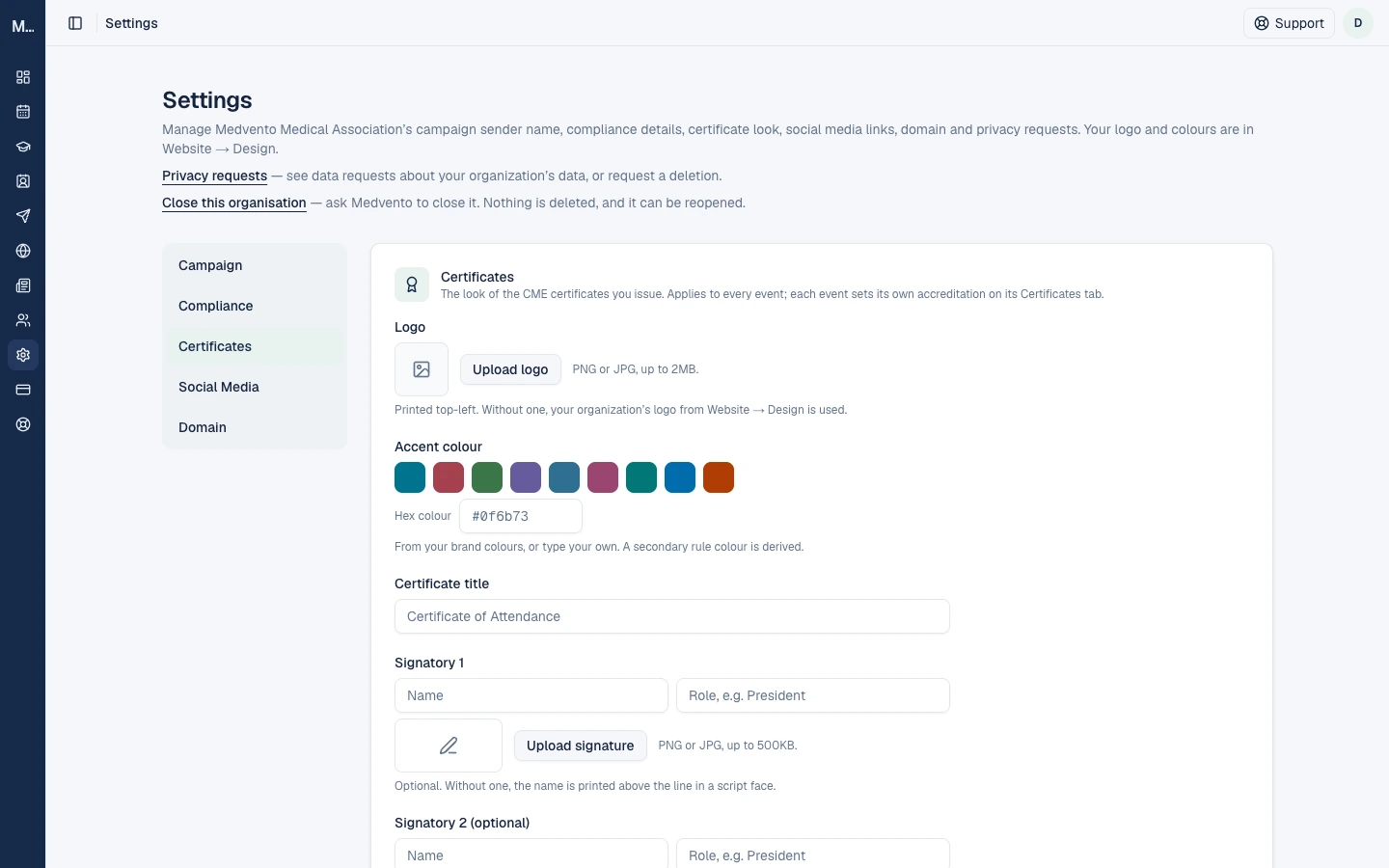
| Setting | Rule |
|---|---|
| Logo | PNG or JPG up to 2 MB, printed top-left. Without one, your organization logo from Website, Design is used. A missing logo never blocks a certificate |
| Accent colour | Pick a swatch or type a hex colour such as #1a2b3c |
| Certificate title | Up to 80 characters. The default is "Certificate of Attendance" |
| Signatory 1 and 2 | Name and role, up to 80 characters each. A maximum of two signatories |
| Signature image | PNG or JPG up to 500 KB. Without one, the name is printed above the line in a script typeface |
| Signature consent | You must tick that the person agrees to their signature being printed on certificates |
| Footer line | Optional, up to 200 characters, for example your registration details |
| Org code | 2 to 8 letters or digits that begin every certificate number. It is fixed once the first certificate number is issued |
The delegate's name, the event, its dates, the credit hours and the certificate number are always printed and cannot be edited.
Use Preview sample to check the layout. It uses made-up people marked SAMPLE and your current form values, and saves nothing.
Certificate numbers
Numbers look like KSC-26-27-000001: your org code, the financial year (April to March) and a six-digit running number. Numbers are never reused.
Step 2: Set the event's accreditation (any team member)
Open the event's Certificates tab.
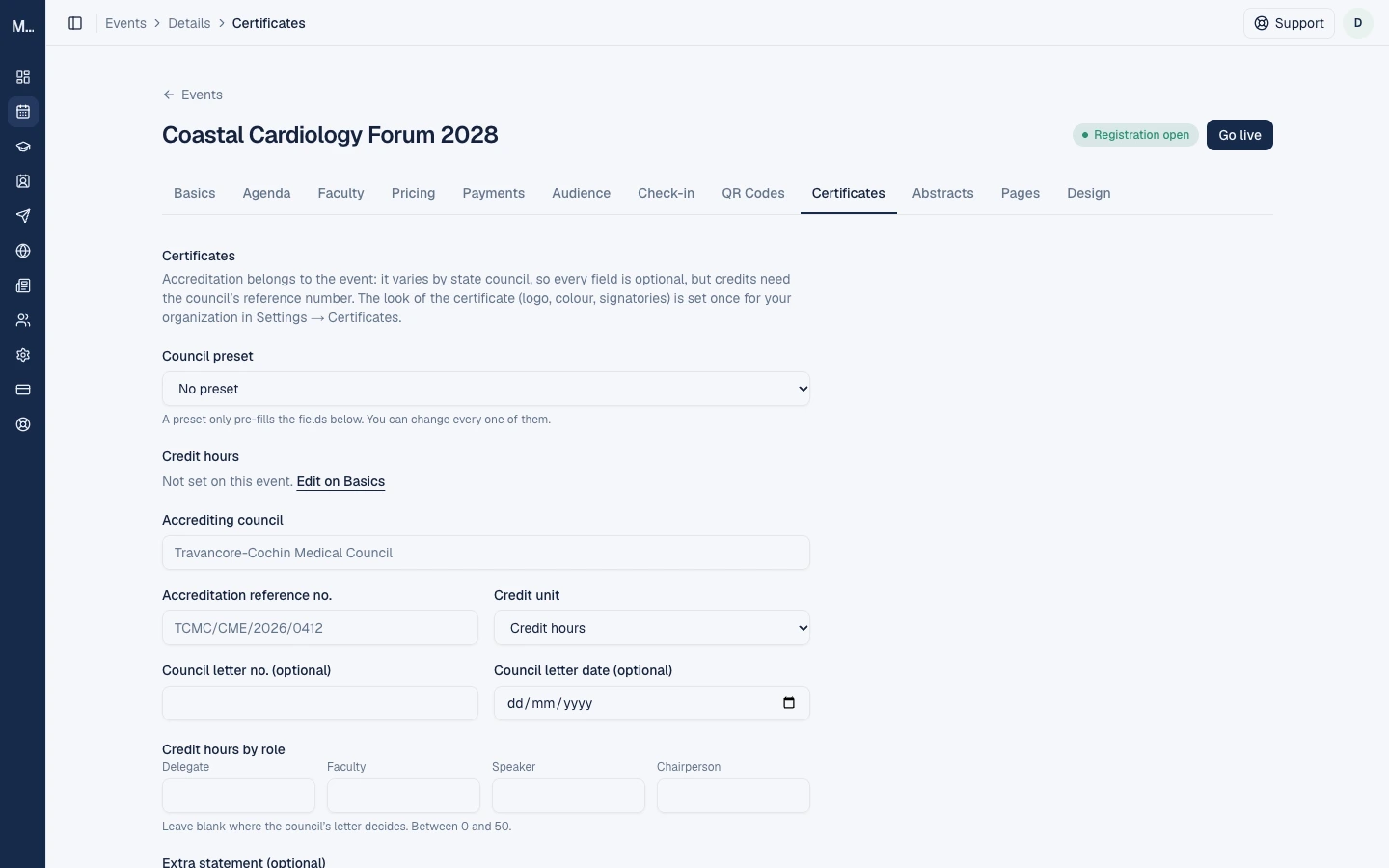
Accreditation varies by state council, so every field is optional, but credits need the council's reference number.
| Field | Notes |
|---|---|
| Council preset | Pre-fills the fields below. Some presets are marked unverified: follow your accreditation letter, not the preset. You can change every field |
| Credit hours | Shown read-only from the event's Basics, with an Edit on Basics link |
| Accrediting council | Up to 120 characters |
| Accreditation reference no. | Up to 60 characters. Required when credits are set |
| Credit unit | Credit hours or Credit points |
| Council letter no. and date | Optional |
| Credit hours by role | Delegate, Faculty, Speaker and Chair, each 0 to 50. Leave blank where the council's letter decides |
| Extra statement | Optional, up to 500 characters |
| Co-host organisation | Optional name, sub-line and logo, printed top-right. The co-host gets no access to your event's data |
| Ask delegates for their council registration number | Optional for the delegate. Shown to you on the Check-in list only, never on public pages, and printed on their certificate if given |
Set the event's CME credit hours in Basics too. The Basics sheet allows 0 to 500 hours, in decimals, and you can still change it after the event is published. Once the event has started, a change asks you to confirm, and certificates already issued never change. Set the hours before the event.
Settings are locked while certificates are being issued. You will see "Certificates are being issued for this event right now, so accreditation details can't change. Try again in a few minutes." After certificates exist, you can still edit, but edits apply only to certificates you reissue.
Step 3: Move the event to post-event
An owner marks the event post-event from the stage button in the event header. This starts issuing. Make sure attendance is recorded before you do, and that the credit hours and accreditation are right.
What happens next, and how long it takes
A background job runs every 5 minutes. Each run issues up to 25 certificates, one at a time, then emails them. For a small event, expect certificates to reach delegates within roughly 5 to 10 minutes. A large event is worked through in batches, so it can take an hour or more. You do not need to keep the page open.
Check progress on the Check-in tab, in the Certificate column.
| Status | Meaning |
|---|---|
| A dash | The event is not post-event yet |
| Pending | Waiting for the next run |
| Waiting | Paused because your organization is suspended or its messaging is on hold. Issuing resumes on the first run after it is lifted |
| Issued | Done. Shows the certificate number and a View link |
| No CME hours | Credit works out to zero. Set the hours and it issues itself |
| Retrying | A temporary failure. It retries automatically |
| Failed | Gave up after 5 attempts |
| Held | A problem the system cannot fix, with a reason, such as text too long to fit or a character that cannot be printed. Shorten the text or contact support |
| Email not sent | The certificate was made but its email did not go out. Use Retry email |
Fix mistakes: reissue and resend
Changing your look or accreditation never changes certificates already issued. To apply a correction, reissue.
| Action | Who | What it does |
|---|---|---|
| Reissue (one delegate) | Owner | Creates a new certificate with a new number, using current details, look and credit hours, and emails it on the next run. The old one is marked replaced. A reason (1 to 500 characters) is required and is never printed or emailed |
| Reissue all | Owner, post-event only | Reissues every issued certificate for the event, up to 5,000 per run, one run at a time. A progress banner shows how many are done |
| Resend | Any team member | Emails the same certificate again, same number. The delegate may receive it twice |
Limits: 5 reissues per registration. 3 resends per certificate, with 10 minutes between requests of any kind. Failed email retries are capped at 5 and do not use up the resend limit. Reissue and resend need an active plan and an organization that is not suspended.
When a certificate is replaced, the delegate's email says: "This certificate replaces number" followed by the old number. "The old certificate no longer verifies. Please discard it." The old QR page then shows that it was replaced. There is no separate revoke.
Privacy and records
- Each certificate's QR code lets anyone with the link verify it, and the registration form tells delegates so.
- If a delegate asks for their data to be deleted, a minimal CME record is kept for 6 years after the event so their credit can still be verified, but the QR page then shows "can't be verified". See privacy and consent for organizers.
Frequently asked questions
How do I issue CME certificates on Medvento?
Set your certificate look and the event's accreditation, record attendance, and move the event to post-event. Certificates are then issued and emailed automatically.
How long do certificates take to arrive?
Usually within about 5 to 10 minutes for a small event. Large events are processed in batches of 25 every 5 minutes.
Why does the roster say No CME hours?
The credit works out to zero. Set the event's CME credit hours, or the Delegate hours on the Certificates tab. It then issues by itself.
I made a mistake. Can I edit an issued certificate?
No. Reissue it. The new certificate gets a new number and the old one stops verifying.
A delegate cannot find their certificate. What do I do?
Use Resend on the Check-in tab. Their only copy is the email.
Can staff reissue certificates?
No. Owners reissue. Any team member can resend.
Next step
Tell delegates how to receive and verify a certificate.
How to submit an abstract for a conference run on Medvento
Submit your abstract with your personal link: pick a topic, enter title, authors and text, attach a file, and see what happens next. No account needed.
How to receive and verify a CME certificate from a Medvento event
How delegates get a CME certificate by email, what to do if it does not arrive, and how anyone can check a certificate is genuine with its QR code.