 Medvento
Plan, billing and GST invoices on Medvento: upgrade, renew and what lapses
How owners upgrade or renew the organization's Medvento plan, what happens when it lapses, how GST invoices and refunds work, and where to find them.
Medvento charges organizations a one-time payment that covers a full year: it is not a recurring subscription, so nothing is taken automatically. Owners upgrade from the Free level or renew from the Billing page. If the plan lapses, your organization becomes read-only (billing, check-in, team access and data requests keep working) until an owner renews. After each confirmed payment, Medvento prepares a GST invoice in the background, usually within about 15 to 30 minutes. Only owners see prices, payment history and invoices.
Before you start
- You must be an owner. Staff see only the plan name and a short message that billing is managed by owners.
- Set your organization's state under Settings, Compliance before paying, because it decides how GST is charged. A valid GSTIN fills it in. See compliance details.
- Prices are set by Medvento and are shown on the Billing page and on medvento.com. This guide does not quote them.
The Billing page
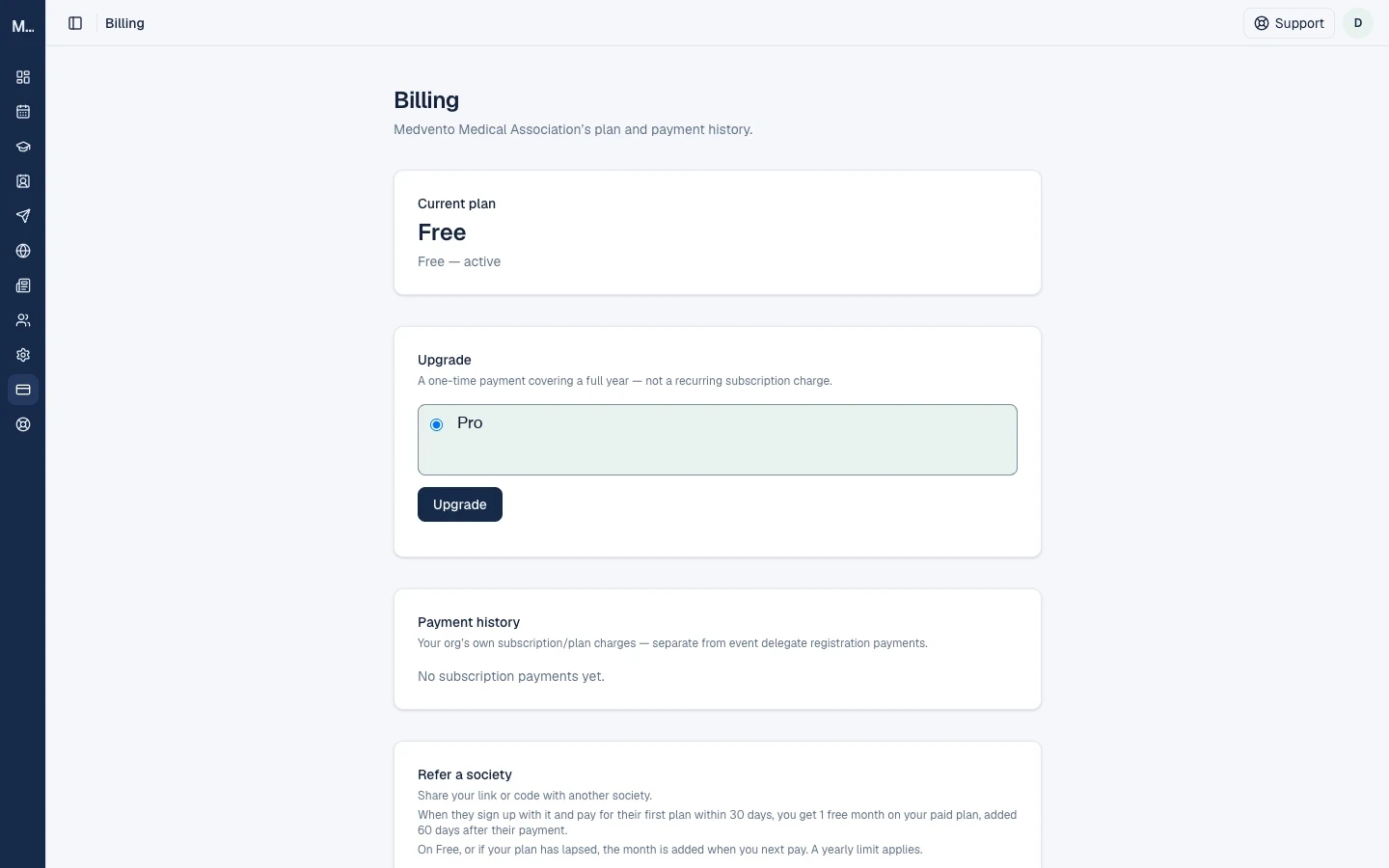
From top to bottom: Current plan, Upgrade (Free level only), Payment history, Refer a society and Campaign GST documents. The prices in this screenshot are hidden.
| Plan status shown | What it means |
|---|---|
| Active until a date | Everything works |
| Expired with a date, "your organization is read-only until you renew" | The year ended and the plan lapsed |
| Payment never completed, "your organization is read-only until you renew" | A paid subscription was chosen at sign-up, or a payment was refunded, and no confirmed payment exists |
| "Your organization is created. Complete the payment below to activate" your plan | You just signed up with a paid subscription. Pay now to activate it |
Upgrade from Free
- Open Billing and review the Upgrade card. It states the amount, the GST and the total.
- Select Upgrade. Razorpay's secure payment window opens, with a 10-minute time-out.
- Pay. The button changes to "Confirming payment" while Medvento waits for the bank.
Your organization stays on Free until the payment is confirmed. Closing the window or abandoning the payment changes nothing. After you pay, the page may show the old plan for a moment, so refresh after about a minute. If you see "Payment never completed" right after paying, read what to do.
While an upgrade is in progress you see "Upgrade to your plan in progress. You stay on your current plan until the payment is confirmed."
Renew
Select Renew now (while active) or Renew / Complete payment (when inactive). Renewal always renews your current plan and cannot switch plans. It extends from the later of your expiry date and today, by one year, so renewing early costs you no days: the new year starts when the current one ends, and the page says "Renewed: your new term starts" with the date.
There is no grace period. If you renew after the plan has lapsed, the new year starts from the payment.
Reminder emails
Medvento emails every owner of the organization, once per stage and never to a suspended organization:
| When | |
|---|---|
| 30, 7 and 1 days before expiry | "Your plan expires soon", with a Renew now button |
| 1 day and 7 days after expiry, then monthly | "Action needed: renew" your plan |
| After sign-up with an unpaid paid subscription: a week later, then monthly | "Action needed: complete payment" |
If a daily run is missed, only the latest reminder is sent.
What happens when a plan lapses
A banner appears on every page except Billing: "Your plan has lapsed, so your organization is read-only", with Renew or Complete payment, and an expandable list of what is blocked.
| Stops working until you renew | Keeps working |
|---|---|
| Creating, editing and publishing events, pages and branding; sessions, tickets and faculty; abstract review; attendee lists and campaigns; WhatsApp messages; inviting team members; logo, sender name and social links; adding or verifying a custom domain | Billing and renewal; viewing and removing team members; delegate check-in; data-protection requests; GST and compliance details; removing a custom domain; downloading invoices and certificates |
Your public pages stay live. Event pages, registrations, abstract submissions and faculty responses keep working. Campaigns you already paid for and certificates that are due still go out.
There is no self-service downgrade, and nothing downgrades automatically. Only Medvento can change your plan. Contact support.
GST invoices
After a payment is confirmed, Medvento prepares a GST tax invoice in the background, about every 15 minutes. Until then the payment row says "Invoice generating". Then it shows Download invoice.
- Invoice numbers look like
MV/26-27/000001: the prefix, the Indian financial year (April to March) and a six-digit number. - The invoice shows your GSTIN, or "GSTIN: Unregistered" with your state, the place of supply, the SAC code, the taxable value, CGST and SGST (same state as Medvento) or IGST (another state), and the total.
- Download invoice opens a short-lived link in a new tab. A saved link expires after about a minute, so use the button each time.
- A pending refund holds the invoice back.
- Outside Medvento's live service, test invoices carry the watermark "TEST — NOT A TAX INVOICE".
Your state matters. Without a GSTIN, set State / Union Territory in Settings. Checkout asks you to set it first: "Set your organization's state in Settings, Compliance before paying (needed for GST)". Changing it affects only checkouts started afterwards.
Campaign invoices and credit notes
Campaign payments have their own Campaign GST documents card on Billing, with tax invoices and credit notes for campaign refunds. See campaigns.
Refunds
You cannot request a refund inside the app. Write to support@medvento.com. Only Medvento can issue one, only for the latest plan payment and for the full amount. You receive an email, "Your plan payment was refunded", saying that refunds usually reach the original payment method within 5 to 7 working days. A refund can take your organization back to its previous plan, move your expiry back, or make the plan need a new payment, and your organization can become read-only. A refund of a plan payment does not produce a GST credit note.
While a refund is being processed, a new checkout is blocked: "A refund on your plan is being processed."
If a payment looks stuck
| Message | What to do |
|---|---|
| "A payment is in progress for this checkout. Try again in a few minutes." | A checkout is open, possibly in another tab. After 15 minutes you can start a fresh one |
| "Your payment was received and is being confirmed, refresh in a minute." | Wait and refresh |
| "A payment was received but couldn't be matched to your plan, contact support@medvento.com" | Contact support with your organization name and payment time. Do not pay again |
Your payment history lists only confirmed payments, never abandoned attempts.
Frequently asked questions
Is the plan a monthly subscription?
No. It is a one-time payment for a full year. Medvento reminds you before it ends.
Does renewing early waste days?
No. The new year starts when the current one ends.
Can staff upgrade or see invoices?
No. Only owners can manage billing and download invoices.
Why is my organization read-only?
Your plan has lapsed or its first payment was never completed. Renew or complete the payment on the Billing page.
How do I downgrade?
You cannot do it yourself. Contact support.
When will my GST invoice appear?
Usually within about 15 to 30 minutes of a confirmed payment.
Next step
Refer another society to earn a free month, or set up compliance details before your first payment.
How to set up your Medvento subdomain or your own domain for event pages
Choose a your-name.medvento.com address or connect a domain you own to your Medvento website, with the rules, DNS steps, plan requirements and limits.
How the Medvento referral program works: refer a society, earn a free month
Share your Medvento referral code or link with another society. When it signs up and pays within 30 days, you earn a free month on your paid term.